How Do You Actually Know If AI Is Working On Your Team?
A few months ago I started leading a team to explore AI and how it can improve developer experience and productivity at my company. I ran weekly meetings, tried experiments with my team, and after a few weeks I had a problem: I couldn't say for sure that AI was making us more productive or by how much.
Engineers were giving mixed signals. Some were excited. Others said AI felt hit or miss — it would nail something obvious, then fall flat on anything touching our codebase conventions, and they'd spend more time correcting it than writing the code themselves. We wanted to show management that the investment was worth it but we had no good metric.
What everyone else is measuring
You've probably seen headlines like "At Company X, all of our code is written by AI" or "AI made our engineers 50% more productive." They rarely explain what that means or how they measured it.
Tool vendors measure lines of code generated and acceptance rate. An engineer can accept every suggestion and throw it all away, so these numbers tell you almost nothing about actual output quality. Productivity percentage sounds, but it's hard to measure varies across developers and even for the same person on similar tasks. It's not reproducible, and it doesn't tell you where to invest to get better.
A better question
Instead of measuring speed, I started asking something more concrete: across a feature's lifecycle, in how many areas can AI reliably carry the work?
Building a feature involves a lot of distinct areas: understanding requirements, system design, front-end components, back-end logic, tests, deployment. For each one, the question is simple: is this covered?
- Covered — a workflow exists, validated against your codebase's real patterns, that at least two people on the team have used successfully. The developer reviews the output, makes minor adjustments, and ships.
- Partial — the AI helps but can't carry the task alone. Something is documented but the workflow isn't complete, or only one person has validated it. Useful, but closer to pair programming than delegation.
- Uncovered — the AI goes in blind, drawing on general training knowledge with no grounding in your specific codebase, it might read your code extensively before starting or it might not. More often the developer ends up steering constantly, like explaining a task to an intern rather than just doing it themselves.
With this framework, new areas start as Partial: one person documents and tests a workflow. When a second person can use it without tweaking, it gets promoted to Covered. Criteria can be adjusted, and over time you can layer in observability to make promotions more data-driven.
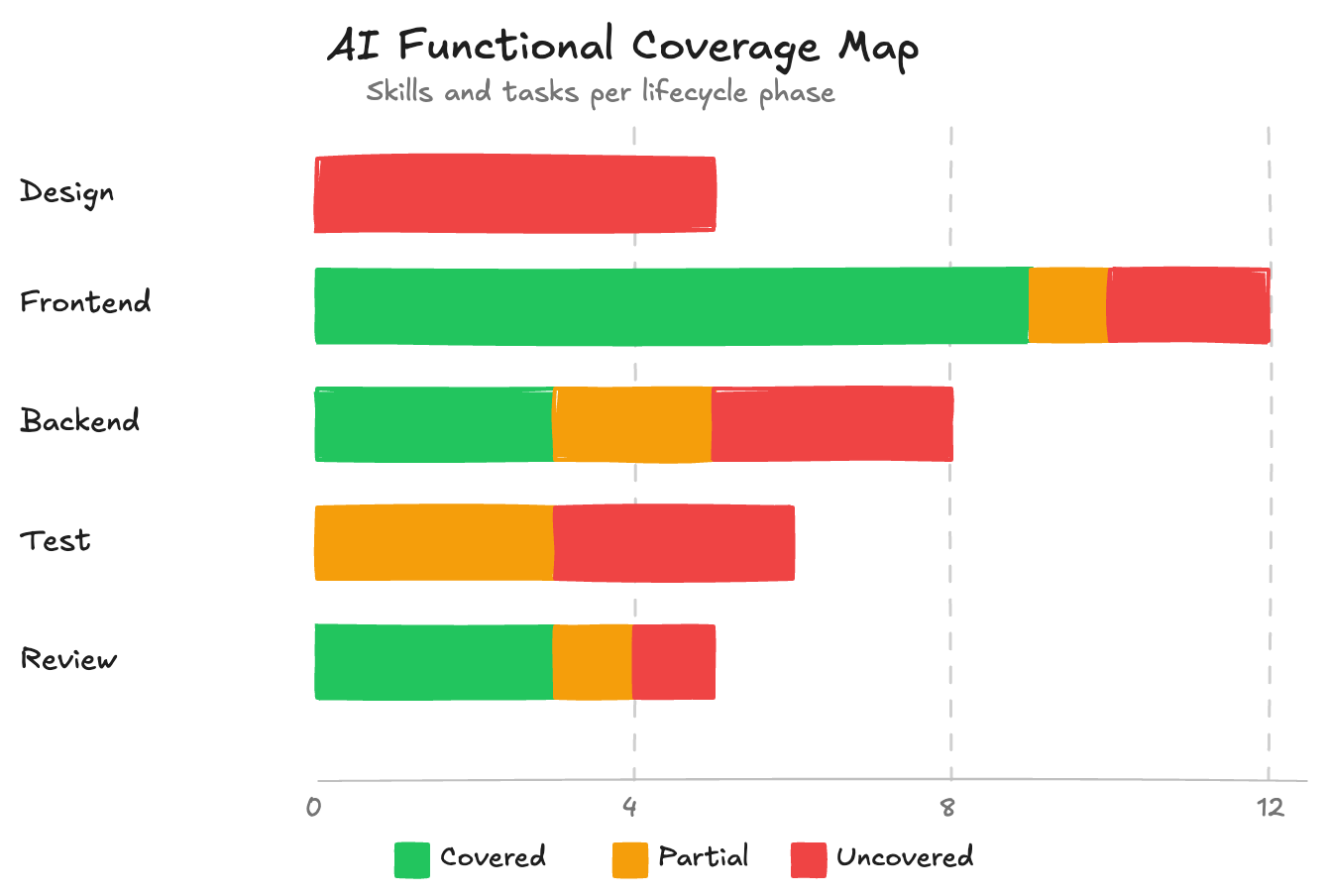
Coverage is infrastructure, not intuition
The reason this metric holds up where productivity percentages don't is that coverage describes your team's system, not a feeling about AI's general capability.
When I say forms are covered on my team, I mean a specific workflow exists that clarifies requirements, delegates to a subagent following our codebase's exact patterns, then runs a second subagent that validates the output against a checklist and corrects mistakes. Two developers with no particular prompting experience can create a form and get consistent, good results — not because AI is magically good at forms, but because the workflow is documented and the standards are encoded.
If an area is partial or uncovered today, the path forward is clear: document the patterns, build the workflow, get teammates to validate it through real usage. No need to wait for smarter models.
Three areas from our codebase
Forms (Covered). A dedicated skill, a subagent trained on our patterns, and a review subagent that catches and fixes problems. Multiple people have used it on production forms. The developer reviews the output and ships.
Scheduled tasks (Partial). Patterns are documented and the AI has something to work from, but there's no complete workflow and only one person has validated it in practice. It helps, but the developer still carries a meaningful share.
Bug investigation (Uncovered). Debugging well means having a method: form a hypothesis, write a failing test to confirm it, trace data. Experienced developers do this intuitively. AI tries things and you end up evaluating random attempts rather than narrowing down. Most people on my team stopped reaching for AI here and just debugged themselves — which is the kind of signal a coverage map is designed to surface.
What you can do with it
A coverage map lets you route work deliberately. Covered areas get delegated. Uncovered areas stop wasting people's time. And when someone asks where to invest, you have a specific answer — not "we need a better model" but "we need to build the workflow for this area." When making the case for AI adoption, it's the difference between "I think it's working" and being able to show exactly where it's working, where it isn't, and what the team is doing about it.